Agentic code assurance

SonarQube MCP Server

Enable your AI agents to use trusted SonarQube analysis to review AI code and maintain high standards within your AI-native IDE.

TRUSTED BY OVER 7M DEVELOPERS WORLDWIDE

Mercedes Benz
Nvidia
Santander

When agentic workflows meet integration chaos

false positive

Verification bottlenecks

AI speeds up code creation, but it creates a new bottleneck: verification. Time saved writing code is lost to a slow, manual verification process, limiting the ROI of your AI tools.

checklist

Broken workflows

Accessing critical code intelligence requires leaving the conversational workflow. This constant context-switching breaks developer focus and undermines the seamless experience AI is meant to deliver.

integration

Custom integrations

As your teams adopt new AI tools, platform engineers are burdened with building and maintaining a fragile ecosystem of brittle, one-off integrations. This custom work is inefficient, costly, and unscalable.

warning

Hidden risks

When code verification is an afterthought, it's easy for AI-generated code to introduce bugs, vulnerabilities, and technical debt. This creates unacceptable business risk and undermines your quality and security standards.

Connect SonarQube to your AI assistants and IDEs

Bridge the gap between AI and quality

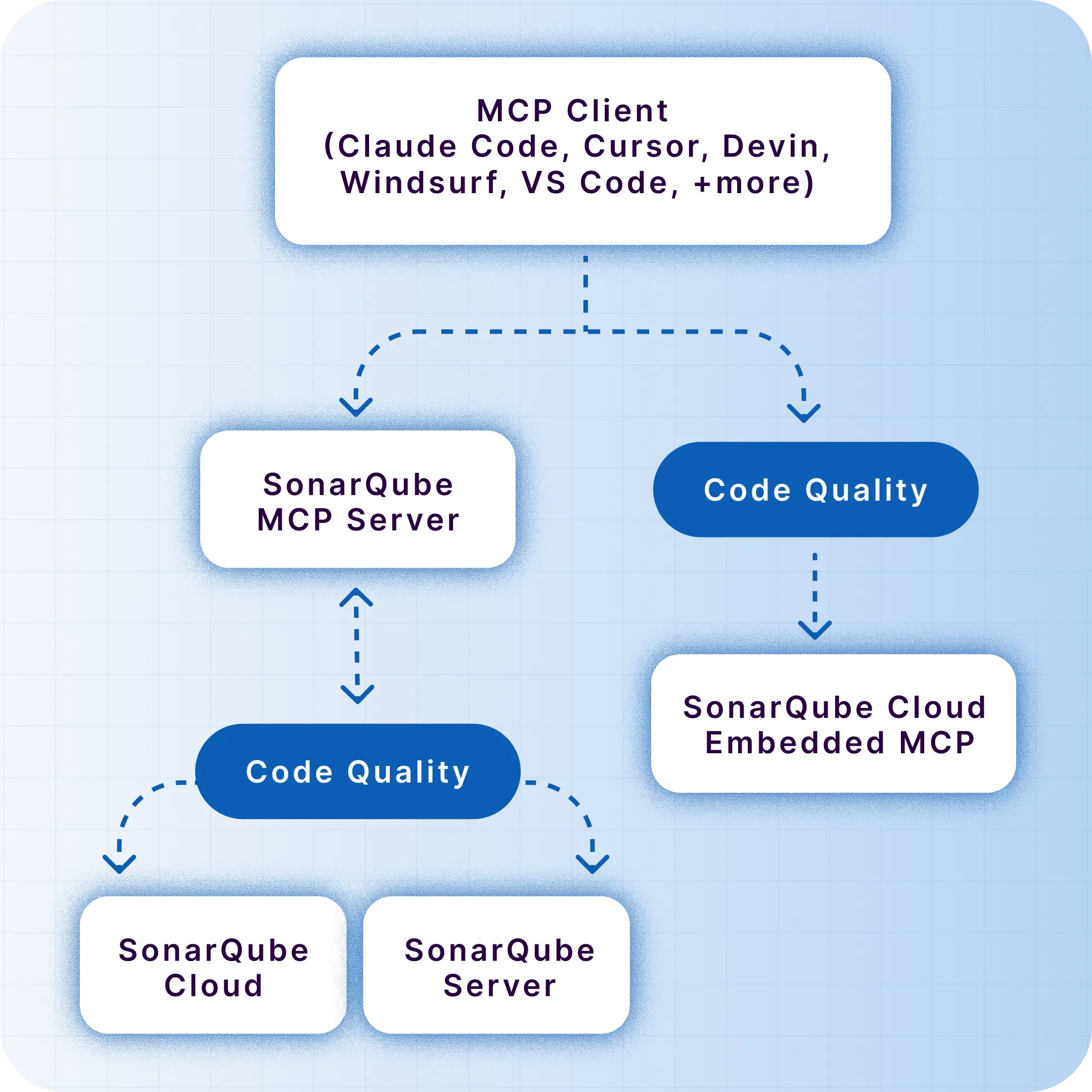
The SonarQube MCP Server integrates SonarQube’s static analysis into AI workflows. Our native MCP channel for SonarQube Cloud provides a zero-effort, out-of-the-box way to connect your AI tools to the code intelligence you trust. For SonarQube Server users or local development, a self-managed Docker-based channel is also available.

Deploy for free
Header image

Get instant answers

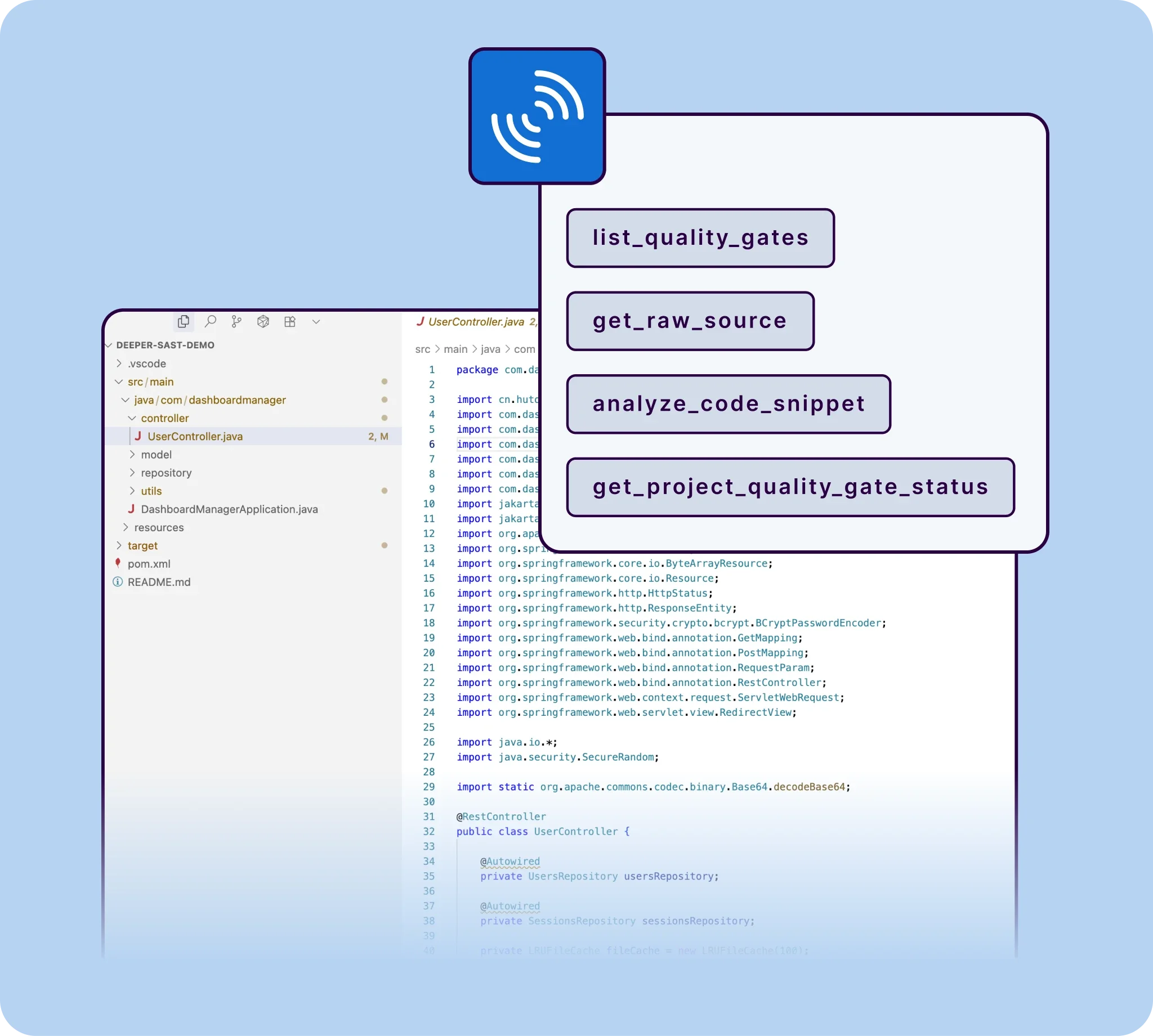
Query your project’s quality gate status, search for dependency risks in your project with SonarQube Advanced Security, or analyze a new code snippet with a simple natural language question.

Stay in your flow

Eliminate the disruptive need to switch between your editor and the SonarQube UI. Maintain focus and boost productivity.

Take action in context

Go beyond analysis. Interactively update an issue's status or mark a false positive directly from your AI assistant, turning insight into action instantly.

Deployment options

Users can now choose between two methods to connect their AI tools to SonarQube:

Local deployment image

Local deployment

Running a Docker container on a workstation to bridge the IDE and SonarQube

sonarqube cloud

Cloud native

Using the embedded endpoint in SonarQube Cloud for centralized access without local software installation

How does it work?

Ask in your AI-native IDE image

Ask in your AI-native IDE

A developer asks their AI agent a question about code quality or security in plain English. Example query: “Are there any new vulnerabilities in this file?”

Translate & query image

Translate & query

The MCP Server translates the request into a precise query for your SonarQube instance (Cloud or Server), identifying the right tool to use, like search_sonar_issues_in_projects.

Get answers in context image

Get answers in context

The AI agent receives the data from SonarQube and presents a clear, actionable answer directly within the developer's editor, completing the seamless, real-time conversation.

Key benefits

For developers

Reclaim your focus

Stop juggling tabs and breaking your flow. Get instant answers from SonarQube about bugs, vulnerabilities, and code smells right within your AI assistant. Analyze any code before you commit and make code quality a seamless part of your workflow.

"Using Amazon Q Developer with the Sonarqube MCP server integration, developers can receive real-time security and code quality feedback directly within their IDE while preserving the immersive 'vibe coding' experience. They maintain productivity and ensure best practices."

Patrick Madec, Sr. Solutions Architect

Build trust into every line of code

The SonarQube MCP channel is available as a native, managed service for SonarQube Cloud or as a source-available Docker container for SonarQube Server. Choose the deployment that fits your environment and start automating quality validation today.

Rating image

4.6 / 5

MCP Server FAQs

What is the MCP Server and how does it help teams deliver quality code?

The MCP Server is a centralized service that connects code analysis and developer tools so teams can consistently enforce standards, automate checks, and improve code quality across repositories. Teams get a single source of truth for code health, enabling faster remediation, standardized workflows, and reliable gates that improve release confidence.

Do I need Docker to use the MCP server?

If you are using SonarQube Cloud, no. You can connect to our managed, native MCP endpoint with zero installation. Docker is only required if you are using SonarQube Server or prefer a local-only development setup.

How does the MCP Server integrate with SonarQube and SonarQube for IDE?

The MCP Server can act as a hub that complements SonarQube by coordinating analysis triggers and aggregating insights from multiple projects. It helps standardize policy enforcement so SonarQube conditions become part of your CI checks, keeping quality at the source and ensuring new code quality gates are applied consistently.

With SonarQube Cloud, the MCP Server can align cloud-based project analysis, ensuring unified governance and reporting. For developers, pairing MCP Server with SonarQube for IDE brings issues into the editor so they can fix problems before commit, strengthening quality at the source and reducing pipeline churn.

What’s the difference between the MCP Server on Community Build vs commercial editions?

On Community Build, teams typically focus on core analysis workflows and baseline governance. The MCP Server can help standardize the basics—consistent rule usage, automated checks in CI, and streamlined reporting—so you achieve strong fundamentals for quality code without adding unnecessary complexity.

Commercial editions unlock advanced features like branch analysis, PR decoration, and enterprise governance. In those setups, the MCP Server can orchestrate broader policy management across multiple projects and repos, enhance PR workflows, and provide richer auditing—useful for larger organizations seeking robust quality at the source practices.
How does the MCP Server support “focus on new code” and quality at the source practices?

The MCP Server helps implement a focus on new code by making quality gates part of everyday development—on branches, pull requests, and pre-merge checks. By catching issues early, it encourages developers to keep changes small and fix problems in context, leading to better quality code with less rework.

Quality at the source is reinforced when developers see actionable feedback in the editor and CI feedback loops. The MCP Server makes those loops consistent across teams and repos, so standards don’t drift and code quality improves steadily with each change.

Can the MCP Server work with multiple CI/CD systems and repositories at scale?

Yes, it’s designed to orchestrate checks across varied CI/CD platforms and many repositories, ensuring consistent enforcement and results. This is especially valuable in polyglot, multi-repo environments where maintaining unified standards can be challenging.

The MCP Server ensures that rules, gates, and reporting are applied uniformly, enabling efficient scaling without sacrificing developer velocity or code quality.

How do developers benefit day-to-day from MCP Server plus SonarQube for IDE?

Developers benefit from immediate, in-editor feedback via SonarQube for IDE, allowing them to fix issues before committing. The MCP Server ensures those same standards are enforced in CI, creating a seamless loop where local fixes translate into passing builds and high new code quality.

This approach minimizes context switching and reduces surprise failures later in the pipeline. Developers spend less time chasing build breaks and more time writing quality code, with consistent feedback from the editor to the pull request.

What security and compliance advantages does the MCP Server provide?

By centralizing policies, the MCP Server makes it easier to enforce consistent security rules. This unified approach supports audit readiness and helps teams demonstrate adherence to internal and external standards.


Automated gates and standardized reporting reduce manual steps that can be error-prone. As a result, security and compliance become integral to the development flow, not an afterthought—improving both speed and rigor.

How does the MCP Server improve pull request workflows and code reviews?

The MCP Server integrates quality checks into pull requests so reviewers see actionable findings before merge. This enables reviewers to focus on architecture and design decisions, while automated checks flag code smells, bugs, and vulnerabilities aligned to your policies.

Consistent, automated gates also reduce review friction—contributors know what’s required for approval, and reviewers trust that baseline quality signals are accurate. The net effect is faster, clearer decisions and higher-confidence merges.

How does the MCP Server handle multi-language monorepos and hybrid (on-prem + cloud) setups?

The MCP Server coordinates analysis across multiple languages and toolchains by standardizing triggers, rules, and reporting, which is particularly helpful in monorepos. It ensures consistent gates regardless of language, keeping quality at the source across the entire codebase.

For hybrid environments, the MCP Server helps align on-prem SonarQube and SonarQube Cloud projects under a common governance layer. This harmonization enables unified visibility and policy enforcement, whether code is analyzed locally, in the cloud, or both.

Unsubscribe